• Home
  • Products
    • IOT Connected Tools
      • WiTorch®
      • WiScope®
      • WiCollab+®
      • WiCollab+® Vision Assist
    • OEM Tools
    • Tools
      • Grabber
      • ITB
    • Customized Solutions
  • Solutions
    • Automotive
    • Industrial Maintenance
    • Manufacturing
    • Field Services
    • Aviation
    • Other
      • Sanitary and Plumbing
      • Other Industries
    • IOT Connected Tools
  • Resources
    • Support
    • Case Studies & Testimonials
    • Guides & Information
    • Software Integrations
  • Partner Portal
  • About Us
    • Company Information
    • Events & Tradeshows
    • Hardware & Software Partnerships
    • Reseller Locator
  • Home
  • Products
    • IOT Connected Tools
      • WiTorch®
      • WiScope®
      • WiCollab+®
      • WiCollab+® Vision Assist
    • OEM Tools
    • Tools
      • Grabber
      • ITB
    • Customized Solutions
  • Solutions
    • Automotive
    • Industrial Maintenance
    • Manufacturing
    • Field Services
    • Aviation
    • Other
      • Sanitary and Plumbing
      • Other Industries
    • IOT Connected Tools
  • Resources
    • Support
    • Case Studies & Testimonials
    • Guides & Information
    • Software Integrations
  • Partner Portal
  • About Us
    • Company Information
    • Events & Tradeshows
    • Hardware & Software Partnerships
    • Reseller Locator
  • About Us

WiCollab® Knowledge Base

⌘K
  • Overview
  • Operating Systems
  • Subsciption Types
  • Downloading WiCollab® Process
  • WiCollab® Operation
    • Login
    • Tool Manager
    • Tool Connection Modes
    • P2P Connection and Camera Mode
    • P2P Connection and Video Mode
    • Network Connection, Camera Mode, and Barcode Mode
    • Network Connection, Video Mode, and Barcode Mode
    • Network Connection, Picture Mode, and OCR Mode
    • Barcode and OCR Scan
    • Barcode and OCR Scanning Mode – WiCollab® Web
    • Live Video Call – Tool User
    • Live Video Call – Remote User
    • Firmware Upgrades
    • Bluetooth
  • WiCollab® App Features
    • Edit Photos
    • Transferring photos and videos
    • Viewing pictures and videos
  • WiCollab®™ App Profile and Reporting Information
  • WiCollab® Web
  • Troubleshooting
  • First time use video
  1. Home
  2. Docs
  3. WiCollab® Knowledge Base
  4. WiCollab® Operation
  5. Firmware Upgrades

Firmware Upgrades

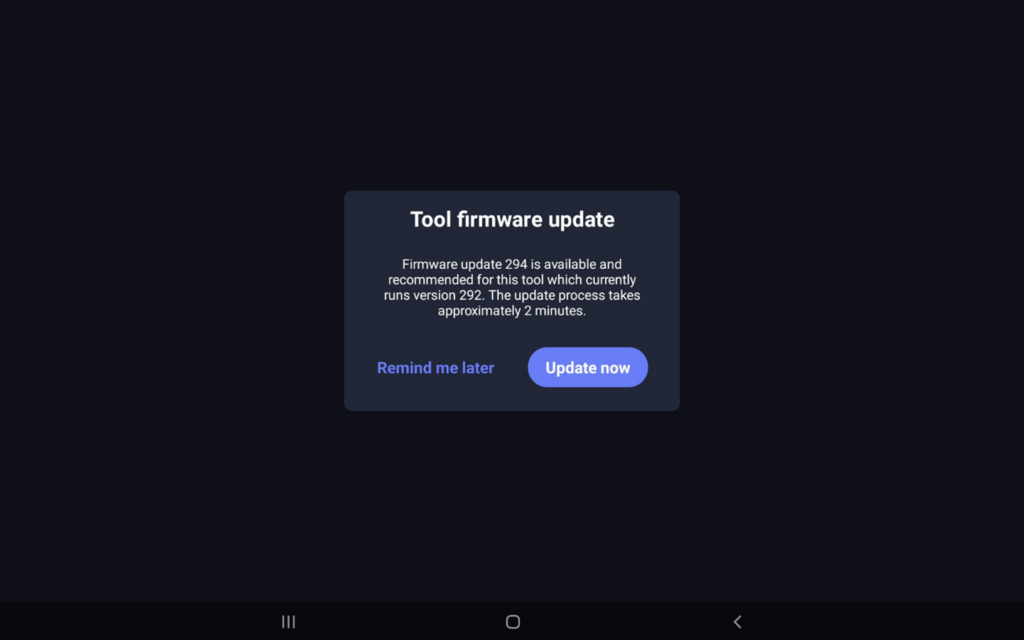
A registered WiCollab® account and WiFi connection must be established to upgrade firmware of the WiScope® or WiTorch®. When you have an available firmware upgrade, the following prompt will be displayed. Select “Update Now”.

Although recommended, it’s not required to update firmware. Simply select “Remind me later” and you can update your firmware upon the next connection.
Doc navigation

← Live Video Call – Remote UserBluetooth →
Home
Products
IOT Connected Tools
WiTorch®
WiScope®
WiCollab+®
WiCollab+® Vision Assist
OEM Tools
Tools
Grabber
ITB
Customized Solutions
Solutions
Automotive
Industrial Maintenance
Manufacturing
Field Services
Aviation
Other
Sanitary and Plumbing
Other Industries
IOT Connected Tools
Resources
Support
Case Studies & Testimonials
Guides & Information
Software Integrations
Partner Portal
About Us
Company Information
Events & Tradeshows
Hardware & Software Partnerships
Reseller Locator
Follow us
Contact
Legal